12/18/25 – Important Reminders on KHSAA360 Schedule Entry
December 18, 2025 Athletic Department Blog Updates
Heading into the various Christmas Tournaments, we feel the necessity to emphasize best practices on entering schedules and the proper steps to take if contests need to be cancelled or rescheduled.
To preface this, we have been discovering more and more that two basic functions in KHSAA360 have been bypassed: The accepting of the game “contract” (which at this point is simply a game revision notification and not an actual game contract), and more alarming, when a change is made, schools (whether it be the Coach or AD) bypass or “Don’t Send” the change notifcation to all involved parties. We know this is happening because we have spent time with assignors who have pointed out changes that appear on their dashboards, for which they received no email notice.
KHSAA360 Scheduling Fundamentals
- Schools are to enter their home contests only. In the event of a cancellation or reschedule, the home team, once the status has been communicated with both teams, must make the agreed-upon change(s) in KHSAA360 and, this is new, accept the contract change for the visiting team.
- Each team’s default assignor group must be set correctly prior to entering any contests. There will be a series of training resources at the bottom of this page that will explain how to properly set.
- All Varsity, JV and Freshman contests must be entered by the home school.
- Contests that are on the home school’s campus that the home school is not participating in must be created using the Tournament Manager. This includes actual regular-season and postseason tournaments (i.e., the Louisville Invitational – LIT, or a KHSAA District or Region), along with any round robins. Essentially, any contest where the home school’s site is a neutral site has to be scheduled using the Tournament Manager
- It is the host school’s responsibility to update the team matchups in successive rounds of the tournaments
- Visiting schools are only allowed to enter scores from within the tournament (accessible from their schedule page).
- No visiting school should enter a duplicate contest outside of the tournament. We see this happening if the tournament manager fails to update the TBA vs. TBA in the subsequent rounds within a reasonable time frame. A visiting school may fear that the games will not appear on the Riherd’s/KHSAA Scoreboard and will mistakenly enter duplicate contests. Visiting schools should always contact the tournament host/home school to nudge them to update the TBA team status.
- When the home team changes the logistics of the contest (date, time, site) and the notification window appears on the screen, it is critical and required that a detailed notification is sent. Do not select “Don’t Send” or uncheck all parties from the selector box. Doing so runs the risk of your assignor not seeing that the contest has been updated.
- If a game needs to be rescheduled or cancelled from within the tournament manager, only your Assigning Secretary can perform this function at this time. Please contact them as soon as possible to change the contest’s status.
Riherds/KHSAA Scoreboard Fundamentals* Need to clarify with Frank)
- TBA Games:
- In general, TBA games appear on the Scoreboard for the current date that they are entered and going forward, although it is possible they may be removed early.
- Changing a game already having a score to a TBA opponent is an undefined condition and will likely impact the team’s Win/Loss Record and RPI until it is manually removed.
- Some schools remove duplicate games this way. However, one should never enter a score for a game that is a duplicate – the duplicate game should have its status changed to “canceled”.
- If a contest is cancelled, whether it is flagged by the home team’s school on their schedule page or by an assignor if the contest is in the tournament manager, it will be properly removed from the scoreboard. Visiting teams should never alter a contest’s status.
- If a contest is to be postponed and then rescheduled, it should initially be flagged as ‘Postponed’ by the home team, and then changed back to ‘League/Non-League’ after the date and time have been updated.
- Scores:
- In general, games with scores are locked on the scoreboard the following day. For Example, if scores are changed the morning after (or later). They will not automatically show up on the Scoreboard and will need a manual intervention step that Mr. Riherd reviews and it could take some time for resolution.
- If the change is considered to be unreasonable, Mr. Milam will reach out to the participating teams for resolution
- Game Changes
- The same holds true for game changes as with scores – any game changes to a game already entered (opponent, site and time) also require the same manual review process.
Additional information and resources
It is imperative to email all score, stat and schedule issues to scheduleentry@khsaa.org. Mr. Riherd and Mr. Milam will both receive and work to resolve.
Training Resources
- KHSAA360 Scribe Resource Room: https://scribehow.com/page/KHSAAArbiter_360_Training_Resources__yP3tNxHdTf-YQxX5Ul4dAA
- YouTube Video Resource Channel: https://www.youtube.com/playlist?list=PLxwXJEK795gQ6OcSiaik5kKOXHUJZ-LQD
For additional clarification regarding this post, please contact Mr. Milam at bmilam@khaa.org or 859-299-5472 Ext. 237
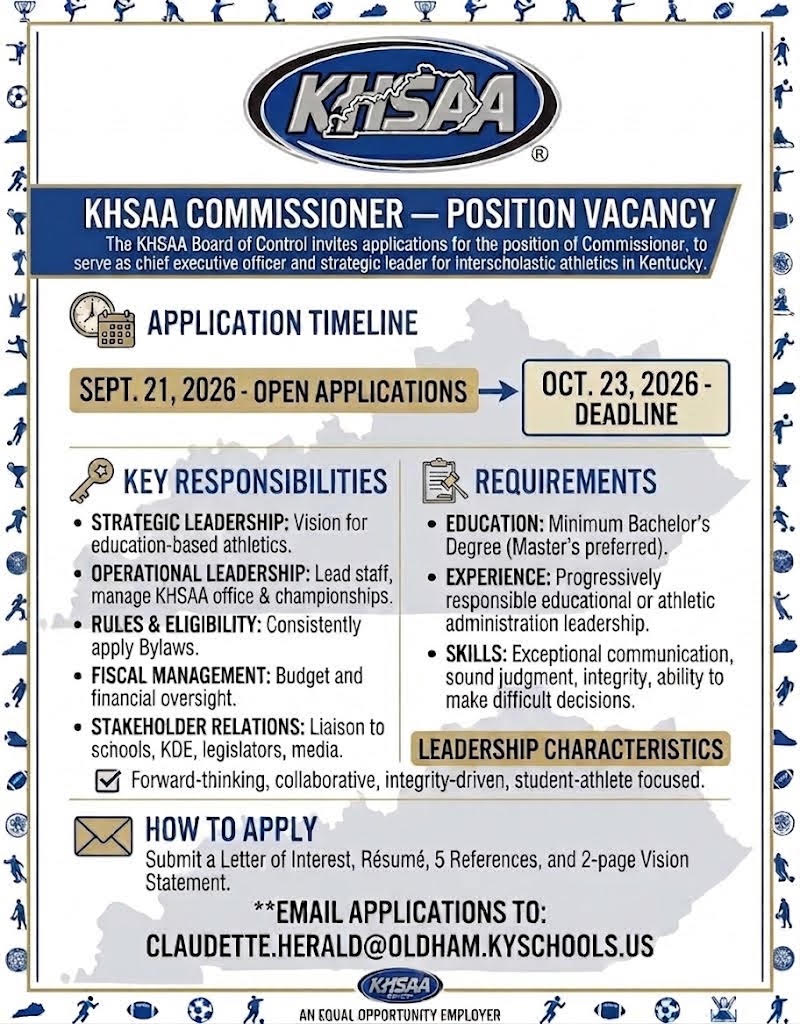
Board of Control Seeks Applications for Commissioner
Official KHSAA Operations Partners
KHSAA News and Notes
- 2026 State: Field Hockey Draw and Pairings
- 10/15/26 – KHSAA Awards 2025-26 NFHS State Coaches of the Year
- 10/10/26 – Final Round Recap at 2026 Leachman Buick GMC Cadillac/KHSAA Girls’ State Golf Championships
- 10/09/26 – TOURNAMENT UPDATE: 2026 Leachman Buick GMC Cadillac Girls’ Golf State Tournament
- 10/09/26 – Round One Complete at 2026 Leachman Buick GMC Cadillac/KHSAA Girls’ State Golf Championships
- 10/07/26 – Final Round Recap of 2026 Leachman Buick GMC Cadillac Boys’ State Golf Tournament
- 10/06/26 – Round One Complete at 2026 Leachman Buick GMC Cadillac/KHSAA Boys’ State Golf Championships
- 10/05/26 – Leachman Buick GMC Cadillac/KHSAA State Golf Championship Begins in Bowling Green
- 09/30/26 – Fall Draw Show to Air October 1 on NFHS Network
- 09/28/26 – Initial RPI Rankings Released for Soccer
- 09/28/26- REMINDER- KHSAA to Again Conduct Title IX Education Meetings for All Schools, Middle Schools Invited
- 09/28/26 – Initial RPI Rankings Released for Football
- 09/21/26 – Board of Control Seeks Applications for the position of Commissioner
- 09/17/26 – Annual meeting of the KHSAA Delegate Assembly Held in Lexington
- 09/16/26 – Board of Control conducts second meeting of 2026-2027
- 09/08/26 – Initial Stat Leader Reports Released for all Fall Sports
- 09/04/26 – KHSAA Commissioner Julian Tackett to Join NFHS
- 08/24/26 – Tackett, Cope Announce Retirement from KHSAA
- 08/11/26 – Volleyball Online Rules Clinic for Coaches & Officials Now Open
- 07/24/26 – Final Approved Track and Field Alignment
- 07/24/26 – Board of Control Conducts First Meeting of 2026-2027
- 07/13/26 – KHSAA Spring Sports Officials of the Year Nominees and Winners Announced
- 07/07/2026 – Exertional Heat Stroke Guidance for High School Football Linemen – NFHS SMAC Task Force
- 06/30/26 – Burney Jenkins Inducted Into National High School Hall of Fame Class of 2026
- 06/11/26 – KHSAA Baseball State Tournament Semifinals Ready for Friday at Kentucky Proud Park
- 06/11/26 – KHSAA Softball State Semifinals Set to Go on Friday at John Cropp Stadium
- 06/06/26 – KHSAA Baseball Quarterfinals conclude, Semifinals are set
- 06/06/26 – Great games highlight the KHSAA Softball State Quarterfinals, Semifinals are set
- 06/05/26 – Quarterfinals set for Saturday in KHSAA Baseball State Tournament
- 06/05/26 – Quarterfinals set in KHSAA Softball State Tournament
- 06/04/26 – Opening Day Recap at KHSAA Softball State Tournament
- 06/04/26 – First Day at the KHSAA Baseball State Tournament Concludes
- 06/03/26 – Baseball, Softball State Tournaments Begin in Lexington On Thursday
- 05/25/26 – Tennis State Championships to Start in Lexington
- 05/23/26 – Class 3A Outdoor Track & Field State Championships Results
- 05/22/26 – Class 2A Outdoor Track & Field State Championships Results
- 05/21/26 – Class 1A Outdoor Track & Field State Championships Results
- 05/20/26 – Outdoor Track & Field Championships Set to Begin Thursday in Lexington
- 05/16/26 – Boys’ and Girls’ Lacrosse State Tournaments Set to Begin at Great Crossing High School
- 05/10/26 – Boys’ Volleyball State Tournament presented by UK HealthCare to begin on campus sites
- 05/07/26 – Bass Fishing State Championships presented by UK HealthCare Scheduled for Friday, Saturday at Kentucky Lake and Lake Barkley
- 05/06/26 – Board Of Control Approves Football Alignment For 2027-2028; Draft Track/Cross Country Alignment; Pickleball, Girls Flag Football To Be Added In 2027-28
- 05/04/26 – KHSAA Student Advisory Group Selected for 2026-27
- 04/28/26 – Spring Draw Show to Air Wednesday on NFHS Network
- 04/27/26 – Initial RPI Rankings Released for Softball, Baseball
- 04/23/26 – Esports Spring State Championships Conclude in Lexington
- 04/20/26 – Initial Stat Leader Reports Released for Softball, Baseball
- 04/16/26 – Inaugural Stat Leader Reports Released for Boys’ Volleyball, Lacrosse
- 04/15/26 – Initial RPI Rankings Released for Boys’ Volleyball, Lacrosse
- 04/14/26 – Spring Media Credential Applications Now Open
- 04/13/26 – Baseball Nominations Sought for Midway/KHSAA Student-Athlete of the Year
- 04/08/26 – Plaugher Named Outstanding Wrestling Official of the Year
- 04/07/26 – Bunnell Named Outstanding Swimming Official of the Year
- 04/07/26 – Steven Vipperman Earns NFHS Section 2 Spirit of Sport Award
- 04/07/26 – Smith Named Outstanding Basketball Official of the Year
- 03/17/26 – UK HealthCare Boys’ Basketball Sweet 16® begins Wednesday at Rupp Arena
- 2026 All-Tournament Team and Awards, Clarks Pump-N-Shop Girls’ Sweet 16®
- 03/10/26 – Clark’s Pump-N-Shop Girls’ Sweet 16® Set to Tip Off Wednesday
- 03/05/26 – Class 2A Indoor Track & Field State Championship Results
- 03/04/26 – Class 3A Indoor Track & Field State Championship Results
- 03/3/26 – Class 1A Indoor Track & Field State Championships Results
- 03/02/26 – Indoor Track & Field State Championships Return to Louisville
- 02/28/26 – Girls’ Wrestling State Championships Conclude at Kentucky Horse Park
- 02/27/26 – Boys’ Wrestling State Championships Conclude at the Kentucky Horse Park
- 02/27/26 – Day One of Boys’ Wrestling State Championship Recap
- 02/24/26 – Introducing the Dawahares/KHSAA Hall of Fame Class of 2026
- 02/24/26 – Wrestling State Championships Return to Alltech Arena
- 02/21/26 – Girls’ Swimming and Diving State Championships presented by UK HealthCare finishes at UK
- 02/20/26 – Boys’ Swimming and Diving Concludes Friday at UK
- 02/19/26 – Board of Control Conducts Fifth Meeting of 2025-26
- 02/13/26 – Sweet 16® Media Credential Applications Now Open
- 02/11/26 – Unified and Adapted State Bowling Championship presented by UK HealthCare concludes in Louisville
- 02/10/26 – Girls’ Bowling State Championships presented by UK HealthCare concludes in Louisville
- 02/09/26 – Boys’/Coed Bowling State Championships presented by UK HealthCare concludes in Louisville
- 01/29/26 – Sweet 16® Draw Show Set for Feb. 3 on NFHS Network
- 01/21/26 – UK Healthcare Orthopaedics & Sports Medicine Seeks Nominations for Kentucky Comeback Athlete of the Year Award
- 01/16/26 – Winter Media Credential Applications Now Open
- 01/15/26 – Board of Control Discusses Football Realignment Considerations, Places Cornerstone Christian in 8th Region, Recognizes The Work of Frank Riherd
- 01/12/26 – Initial RPI Rankings Released for Basketball
- 01/12/26-Boys’ & Girls’ Basketball Nominations Sought for Midway/KHSAA Student-Athlete of the Year
- 01/11/26 – Dance State Championships presented by UK HealthCare Concludes in Winchester
- 01/10/26 – Winners Crowned in Game Day Small/Large at the 2025-2026 Competitive Cheer State Championships presented by UK HealthCare
- 01/09/26 – Results of Day 1 From Competitive Cheer State Championship presented by UK HealthCare
- 01/08/26 – Competitive Cheer and Dance State Championships presented by UK HealthCare to conclude in Winchester
- 01/05/26 – Brummett Named 2025 Football Official of the Year
- 12/17/25 – Updated Scheduling Information for State Competitive Cheer/Dance Championships
- Cheer / Dance State Championships Postponed Due to Weather
- 12/10/25- Fall Esports Season Concludes with 6 Champions Crowned
- 12/9/25 – Esports Fall State Championships to Conclude in Lexington
- 12/8/25 – Competitive Cheer, Dance to Conclude in Winchester
- 12/6/25 – Owensboro wins the 2025 UK HealthCare Sports Medicine State Finals
- 12/6/25 – Trinity wins the 2025 UK HealthCare Sports Medicine Class 6A State Football Final
- 12/6/25 – Christian Academy-Louisville wins the 2025 UK HealthCare Sports Medicine State Football Final
- 12/5/25 – Boyle County wins 2025 UK HealthCare Sports Medicine Class 4A State Title
- 12/05/25 – Lexington Christian wins the 2025 UK HealthCare Sports Medicine Class 2A State Title
- 12/05/25 – Kentucky Country Day wins 2025 Class 1A UK HealthCare Sports Medicine State Finals
- 11/14/25- Information to Order Football Finals Tickets
- 11/21/25 – Houston Named 2025-26 Soccer Official of the Year
- 11/21/25 – Bauer Named 2025-26 Field Hockey Official of the Year
- 11/21/25 – Adams Named 2025-26 Girls’ Volleyball Official of the Year
- 11/17/25 – KHSAA Awards 2024-25 NFHS State Coaches of the Year
- 11/13/25 – Board of Control to Monitor Possible Changes in Several Sports
- 11/12/25 – State Dance Time Schedules & Instructions Released
- 11/12/25 – State Competitive Cheer Time Schedules & Instructions Released
- 11/08/25 – Assumption wins KHSAA Girls’ Volleyball State Championship presented by UK HealthCare
- 11/5/25 – Advance Tickets for the Quarterfinals of the KHSAA Girls’ Volleyball State Tournament presented by UK HealthCare
- 11/2/25 – Advance Tickets for KHSAA Girls’ Volleyball State Tournament presented by UK HealthCare
- 11/1/25 – Results from the Kentucky Beef Council Cross Country State Championships presented by UK HealthCare
- 10/29/25 – KHSAA Boys’ Soccer State Finals presented by UK HealthCare set for Saturday
- 10/25/25 – 2025 State Cross Country Qualifiers
- 10/23/25 – KHSAA Field Hockey State Tournament Field Is Set
- 10/23/25 – KHSAA Boys’ Soccer State Quarterfinal Round
- 10/22/25 – Girls’ Soccer State Tournament Enters Quarterfinal Round
- 10/11/25 – Final Round Recap of Leachman Buick GMC Cadillac Boys’ State Golf Tournament
- 10/10/25 – Opening Round Results: Leachman Buick GMC Cadillac boys’ golf state tournament presented by UK HealthCare
- 10/08/25 – Leachman Buick GMC Cadillac Girls’ Golf State Finals
- 10/07/25 – Leachman Buick-GMC-Cadillac Girls’ Golf State Tournament First Round Scores
- 10/07/25 – WEATHER UPDATE: Leachman Buick-GMC-Cadillac Girls’ Golf State Tournament
- 10/06/25 – KHSAA Leachman Buick GMC Golf State Tournament Update
- 2025 State: Field Hockey Draw and Pairings
- 09/30/25 – Fall Draw Show to Air October 1 on NFHS Network
- 09/26/25 – Girls’ Volleyball Nominations Sought for Midway/KHSAA Student-Athlete of the Year
- 09/26/25 – KHSAA HYPE Student Leadership Conferences Begins Monday
- 09/23/25- Nominations Sought For Midway Football Student Athlete-of-the-Year Awards
- 09/22/25 – Initial RPI Rankings Released for Soccer
- 09/18/25 – Annual meeting of the KHSAA Delegate Assembly Held in Lexington
- 09/17/25 – Board of Control conducts second meeting of 2025-26
- 09/16/25 – Media Credential Application for remainder of 2025 is now open
- 09/15/25 – Initial Stats Leaders Report Released for Soccer
- 09/11/25 – Boys’ and Girls’ Soccer Nominations Sought for Midway/KHSAA Student Athlete-of-the-Year
- 09/11/25 – Girls’ Volleyball Nominations Sought for Midway/KHSAA Student Athlete-of-the-Year
- 08/28/25 – KHSAA Board of Control to Hold Special Meeting September 2, 2025
- 8/27/25- REMINDER- KHSAA to Again Conduct Title IX Education Meetings for All Schools, Middle Schools Invited
- 08/27/25 – LSC stadium to host KHSAA Soccer State Finals
- 08/25/25 – KHSAA HYPE Student Leadership Conferences Registration Now Open
- 08/18/25 Football Online Rules Clinic for Coaches & Officials Now Available
- 8/18/25 Soccer Online Rules Clinic for Coaches & Officials Now Available
- 08/18/25 – Volleyball Online Rules Clinic Available for Coach and Officials
- NFHS Learning Center Continues to ‘Protect the Purpose’ of High School Sports, Activities
- 08/04/25 – Brian Milam joins KHSAA Executive Staff
- 08/01/25 – Board of Control conducts first meeting of 2025-26
- 07/18/25 – NFHS Announces Girls’ Lacrosse Playing Rule Changes
- 07/17/25 – NFHS Announces Track & Field Rule Changes
- 07/16/25 – NFHS Announces Softball Playing Rule Changes
- 07/15/25 – NFHS Announces Boys’ Lacrosse Playing Rule Changes
- 07/14/25 – NFHS Announces Baseball Playing Rule Changes
- 07/02/25 – KHSAA, Friends of Coal Announce Inaugural Friends of Coal Captains Club Honorees
- 07/01/25 – Fromeyer Named 2024-25 Officials Supervisor of the Year
- 06/30/25 – Thornsburg Named 2024-25 Baseball Official of the Year
- 06/30/25 – Welch Named 2024-25 Softball Official of the Year
- 06/30/25 – Morton Named 2024-25 Track & Field Official of the Year
- 06/26/25 – Cecil Named 2024-25 Boys’ Lacrosse Official of the Year
- 06/26/25 – Cooksey Named 2024-25 Girls’ Lacrosse Official of the Year
- 06/25/25 – Franklin Named 2024-25 Boys’ Volleyball Official of the Year
- 06/14/25 – Gary Ball Receives Bob White/Mike Fields Media Service Award
- 6/12/2025- Baseball / Softball Championship Game Times Changed
- 06/06/25 – Revised Schedules for Baseball, Softball State Tournaments
- 06/04/25 – Clark’s Pump-N-Shop Baseball, Softball State Tournaments to Lead Off at UK
- 06/03/25 – Myers, Harper Named 2024-25 Midway/KHSAA Student-Athletes of the Year
- 05/28/25 – Outdoor Track & Field State Championships to Begin at UK
- 05/26/25 – Tennis State Championships to Start in Lexington
- 05/22/25 – NFHS Announces Basketball Playing Rule Changes
- 05/13/25 – Inaugural Lacrosse, Boys’ Volleyball State Tournaments to Begin on Campus Sites
- 05/08/25 – Bass Fishing State Championships to Make Lake Cumberland Debut
- 05/07/25 – Board of Control Selects 2025-26 President-Elect; Approves Competition Rules Amendment at Golf State Championships; Continues Consideration of Amendments to Bylaws 6, 7
- 05/06/25 – Ashurst Named 2024-25 Basketball Official of the Year
- 05/06/25 – Boone Named 2024-25 Swimming & Diving Official of the Year
- 05/06/25 – Hayes Named 2024-25 Wrestling Official of the Year
- 05/05/25 – NFHS Announces Wrestling Rule Changes
- 05/05/25 – KHSAA Student Advisory Group Selected for 2025-26
- 04/30/25 – Esports Spring Season to Wrap Up in Lexington
- 04/28/25 – Spring Draw Show to Air Tuesday on NFHS Network
- 04/28/25 – Initial RPI Rankings Released for Softball, Baseball
- 04/21/25 – Initial Stat Leader Reports Released for Softball, Baseball
- 04/18/25 – NFHS Announces Swimming Rule Changes
- 04/16/25 – Operation UNITE Archery State Championships Return to Lexington
- 04/14/25 – Initial RPI Rankings Released for Boys’ Volleyball, Lacrosse
- 04/10/25 – Spring Media Credential Applications Now Open
- 04/07/25 – Baseball Nominations Sought for Midway/KHSAA Athlete-of-the-Year
- 04/07/25 – Boys’ Volleyball Nominations Sought for Midway/KHSAA Student Athlete-of-the-Year
- 04/07/25 – Inaugural Stat Leader Reports Released for Boys’ Volleyball, Lacrosse
- 03/27/25 – Ivan Rice, Rick Shaw Awarded First-Ever Bob White/Mike Fields Media Service Award
- 03/27/25 – Neil Middleton Earns NFHS State Award For Outstanding Service
- 03/25/25 – UK HealthCare Boys’ Sweet 16® to Tip Off at Rupp Arena
- 03/19/25 – NFHS Announces Cheer, Dance Rule Changes
- 03/18/25 – NFHS Announces Soccer Playing Rule Changes
- 03/15/25 – Britt Redman Earns NFHS Section 2 Spirit of Sport Award
- 03/11/25 – Clark’s Pump-N-Shop Girls’ Sweet 16® Set to Tip Off Wednesday
- 03/03/25 – Second Annual Indoor Track & Field State Championships Return to Louisville
- 02/26/25 – Sweet 16® Media Credential Applications Now Open
- 02/26/25 – Wrestling State Championships Return to Alltech Arena
- 03/04/25 – Nominations for KHSAA Student Advisory Group-NFHS National Student Leadership Summit Being Accepted
- 02/19/25 – Board of Control Approves State Site Plan Adjustments for Baseball, Tennis, Swimming & Diving
- 02/19/25 – Introducing the Dawahares/KHSAA Hall of Fame Class of 2025
- 02/12/25 – NFHS Announces Field Hockey Playing Rule Changes
- 02/12/25 – NFHS Announces Football Playing Rule Changes
- 02/11/25 – NFHS Announces Volleyball Playing Rule Changes
- 02/10/25 – Sweet 16® Draw Show Set for Feb. 14 on NFHS Network
- 02/07/25 – Winter State Championships to Continue with Swimming & Diving, Bowling
- 01/28/25 – Isable Named 2024-25 Football Official of the Year
- 01/21/25 – Clark’s Pump-N-Shop Expands Partnership as Title Sponsor of Girls’ Basketball Sweet 16®
- 01/16/25 – Board of Control Approves Final Changes to Region 6 Alignment, Adopts Postseason Format for Lacrosse
- 01/13/25 – Initial RPI Rankings Released for Basketball
- 01/10/25 – KHSAA, Friends of Coal Announce Exciting Partnership to Highlight Kentucky Traditions of Resilience, Community
- 01/06/25 – Initial Stat Leader Reports Released for Basketball
- 12/17/24 – Esports Fall State Championships to Conclude in Lexington
- 12/12/24 – Competitive Cheer, Dance to Begin in Winchester
- 12/05/24 – UK HealthCare Sports Medicine Football State Finals to Crown 6 Champions in Lexington
- 11/26/24 – Anderson Named 2024-25 Girls’ Volleyball Official of the Year
- 11/26/24 – Sabanovic Named 2024-25 Soccer Official of the Year
- 11/26/24 – Niblock Named 2024-25 Field Hockey Official of the Year
- 11/22/24 – UK Healthcare Orthopaedics & Sports Medicine Seeks Nominations for Kentucky Comeback Athlete of the Year Award
- 11/21/24 – Winter Media Credential Applications Now Open
- 11/18/24 – KHSAA Awards 2023-24 NFHS State Coaches of the Year
- 11/15/24 – Board of Control Approves Alignment for Lacrosse, Boys’ Volleyball; Revisions to Alignment for Field Hockey, Regions 6-7 Basketball, Region 1 Soccer
- 11/04/24 – Girls’ Volleyball State Tournament to Begin at First-Round Sites
- 11/01/24 – Cross Country State Championships to Take Off in Lexington
- 10/24/24 – Field Hockey Returns to Louisville for 11th State Tournament
- 10/21/24 – Soccer State Tournaments to Kick Off On Campus Sites
- 10/18/24 – KHSAA member school students invited to apply for 2025 Kentucky Ag Athletes-of-the-Year
- 10/03/24 – Tee Times Published for State Golf Final Round
- 10/02/24 – Fall Draw Show to Air Oct. 4 on NFHS Network
- 10/01/24 – KHSAA Combined Participation Tops 115,000 for First Time in 2023-24
- 09/29/24 – Opening Rounds of Golf State Championships Set to Tee Off
- 09/26/24 – Board of Control Approves Bass Fishing Site Rotation
- 09/18/24 – Fall Media Credential Applications Now Open
- 09/16/24 – Initial RPI Rankings Released for Football, Volleyball, Field Hockey
- 09/10/24 – Girls’ Volleyball Nominations Sought for Midway/KHSAA Student Athlete-of-the-Year
- 09/09/24 – Initial RPI Rankings Released for Soccer; Stat Leader Reports Released for Football, Volleyball, Field Hockey
- 09/03/24 – Initial Stat Leader Reports Released for Soccer
- 08/27/24 – KHSAA HYPE Student Leadership Conferences Registration Now Open
- 08/22/24-Wet Bulb Globe Temperature (WBGT) Game Adjustments
- 08/16/2024- KHSAA School Directory Available via ArbiterLive
- 08/02/24 – Board of Control Conducts First Meeting of 2024-25
- 07/31/24 – MileSplit Named Online Registration Provider for KHSAA Cross Country, Track & Field
- 07/15/24 – NFHS Announces Softball Playing Rule Changes
- 07/10/24 – NFHS Announces Track & Field Rule Changes
- 07/09/24 – Officials Supervisor of the Year Announced
- 07/09/24 – Softball Official of the Year Announced
- 07/08/24 – Baseball Official of the Year Announced
- 07/08/24 – Track & Field Official of the Year Announced
- 06/27/24 – NFHS Announces Baseball Playing Rule Changes
- 06/24/24 – Abby Jackson Hired as KHSAA Assistant Commissioner
- 06/24/24 – ArbiterSports, KHSAA, Riherds.com Announce Revolutionary Partnership for School Data Management Services
- 06/05/24 – Baseball, Softball State Tournaments to Begin in Lexington
- 06/04/24 – Thurmond, Germann Named 2023-24 Midway/KHSAA Student-Athletes of the Year
- 05/30/24 – Times Set for First Rounds of Baseball, Softball State Tournaments
- 05/29/24 – Track & Field State Championships to Run Thursday, Friday, Saturday in Lexington
- 05/27/24 – Tennis State Championships to Begin at UK, EKU, Berea College
- 05/14/24 – First, Second Rounds of Baseball State Tournament to Return to Legends Field
- 05/14/24 – NFHS Announces Basketball Playing Rule Changes
- 05/10/24 – Watch the Spring Draw Show May 14 on KHSAA.tv
- 05/09/24 – KHSAA Student Advisory Group Selected for 2024-25
- 05/09/24 – Board of Control Approves Final Football Alignment for 2025, 2026; Sets Tentative Season Parameters for Lacrosse, Boys’ Volleyball for 2025
- 05/07/24 – Bass Fishing State Championships Scheduled for Friday, Saturday at Kentucky Lake
- 04/30/24 – NFHS Announces Wrestling Rule Changes
- 04/24/24 – Esports Spring State Championships to Debut Pair of New Titles
- 04/10/24 – Basketball Official of the Year Announced
- 04/10/24 – Media Credentials Now Available for Spring Championships
- 04/09/24- KHSAA Partners with Advance NIL for Comprehensive Education Effort
- 04/08/24 – NFHS Announces Soccer Playing Rule Changes
- 04/08/24 – SWIMMING & DIVING OFFICIAL OF THE YEAR ANNOUNCED
- 04/08/24 – Initial RPI Rankings Released for Baseball and Softball
- 04/02/24- Advisory Concerning Outdoor Sports, Monday April 8
- 04/02/24- KDPH Resource Documents Related to April 8, 2024 Solar Eclipse
- 04/01/24 – Initial Stat Leader Reports Available for Baseball, Softball
- 04/01/24 – Wrestling Official of the Year Announced
- 03/18/24- KHSAA Seeks Fifth Assistant Commissioner (new position)
- 03/11/24 – Mingua Beef Jerky Girls’ Basketball Sweet 16® to Tip Off at Rupp Arena
- 03/21/24 – Recipients Announced for Ninth Annual Louis Stout Memorial Scholarships
- Mingua Beef Jerky Girls’ Sweet
- 03/01/24 – Inaugural Indoor Track & Field State Championships to Debut in Louisville
- 02/21/24 – Sweet 16® Media Credential Applications Now Open
- 02/20/24 – Board of Control Approves Draft of 2025, 2026 Football Alignment
- 02/16/24 – Swimming State First Round to Start Saturday
- 02/14/24 – Boys’/Coed, Inaugural Girls’ Wrestling State Championships to Begin in Lexington
- 02/08/24 – NFHS Announces Football Playing Rule Changes
- 02/08/24 – NFHS Announces Volleyball Playing Rule Changes
- 02/05/24 – Sweet 16® Draw Show to Air Feb. 12 on NFHS Network
- 02/02/24 – NFHS Announces Field Hockey Playing Rule Changes
- 02/02/24 – Nominations for KHSAA Student Advisory Group-NFHS National Student Leadership Summit Being Accepted
- 02/02/24 – Introducing the Dawahares/KHSAA Hall of Fame Class of 2024
- 02/01/24 – Bowling State Championships Return to Jeffersontown Next Week
- 01/17/24 – Board of Control Looks Ahead to Winter State Championships
- 11/16/24 – Start of Regularly Scheduled Board of Control Meeting Delayed Two Hours Due to Weather
- 01/08/24 – Applications Being Accepted for Louis Stout Memorial Scholarships for 2023-2024
- 01/04/24 – The Dairy Alliance Champions High School Athletics With Nature’s Drink
- 01/02/24 – Initial RPI Rankings Released for Basketball
- 12/18/23 – Initial Stat Leader Reports Released for Basketball
- 12/13/23 – Two KHSAA Coaches Tabbed as NFHS Section II Coaches of the Year
- 12/11/23 – Football Official of the Year Announced
- 12/06/23 – Tedi Henderson of DuPont Manual Selected to NFHS National Student Advisory Council
- 12/06/23 – George Rogers Clark to Host Cheer, Dance State Championships Over Weekend
- 12/04/23 – Media Credentials Now Available for Winter Championships
- 11/29/23 – UK HealthCare Sports Medicine Football State Finals to Kick Off at Kroger Field
- 11/28/23 – UK Healthcare Orthopaedics & Sports Medicine Seeks Nominations for Kentucky Comeback Athlete of the Year Award
- 11/21/23 – Volleyball Official of the Year Announced
- 11/21/23 – Soccer Official of the Year Announced
- 11/17/23- Vacancy Announcement for Office Manager (Regular, Full-time) – Search Extended
- 11/16/23 – Field Hockey Official of the Year Announced
Athletic Department Reminders
- 2026 State: Field Hockey Draw and Pairings
- 10/13/26 – Bowling Online Rules Clinic for Coaches Now Available
- 10/09/26 – Girls’ Golf Day 2 Pairings
- 10/08/26 – Competitive Cheer KHSAA Regional Time Schedules & Division Totals
- 10/08/26 – Dance KHSAA Regional Time Schedules & Division Totals
- 10/06/26 – Boys’ Golf Day 2 Pairings
- 10/01/26 – Tee Times Published for State Golf Final Round
- 10/01/26 – List of Items Needed for Annual Required Financial Aid Report
- 10/01/26 – Basketball Shot Clock Guidelines Adopted
- 09/28/26- REMINDER- KHSAA to Again Conduct Title IX Education Meetings for All Schools, Middle Schools Invited
- 09/24/26 – State Golf First Round Pairings
- 09/21/26 – Dance Regional Competition Information
- 09/21/26 – Competitive Cheer Regional Competition Information
- 09/21/26 – Board of Control Seeks Applications for the position of Commissioner
- 09/17/26 – Annual meeting of the KHSAA Delegate Assembly Held in Lexington
- 09/15/26 – 2026 Cross Country Postseason Updates & Regional Instructions Available
- 09/14/26 – Cross Country Nominations Sought for Midway/KHSAA Student-Athlete of the Year
- 09/10/2026 – Fall Esports Registration + Free Program-Building Webinars 🎮
- 9/9/26 – Soccer Roster/Schedule/Scores/Stats/Photos — Entry in Arbiter (KHSAA 360) Reminder
- 09/08/26 – Competitive Cheer Rules Clinic Now Available
- 09/8/26 – Volleyball Roster/Schedule/Scores/Stats/Photos — Entry In Arbiter (KHSAA 360) Reminder
- 09/07/26 – Dance Rules Clinic Now Available
- 09/08/26 – Golf Regional Instructions and Postseason Reminders
- 09/04/2026 – KHSAA/PlayVS Fall Esports Rules Clinic Now Available
- Field Hockey Nominations Sought for Midway/KHSAA Student-Athlete of the Year
- 09/03/26 – Soccer Nominations Sought for Midway/KHSAA Student-Athlete of the Year
- 09/02/26 – Competitive Cheer Declaration Form for KHSAA Postseason Now Open
- 09/02/26 – Dance Declaration Form for KHSAA Postseason Now Open
- 08/31/26 – 2026 KHSAA Annual Meeting Reminder
- 08/24/26 – Tackett, Cope Announce Retirement from KHSAA
- 08/18/26 – State Golf First Round Site Change (Regions 9-12)
- 08/11/26 – Cross Country Hosts for 2026 Regionals
- 8/11/2026 – Soccer Online Rules Clinic for Coaches & Officials Now Open
- 8/11/26 – KHSAA Field Hockey Online Rules Clinic Now Available
- 08/11/26 – Cross Country Rules Clinic Now Available
- 08/11/26 – KHSAA Esports Discounted Pricing Deadline Extended to Friday, September 4
- 08/11/26 – Golf Nominations Sought for Midway/KHSAA Student-Athlete of the Year
- 8/7/26 – One-way Electronic Communications Allowed for Pitchers Under 2027 High School Softball Rules Changes
- 08/11/26 – Volleyball Online Rules Clinic for Coaches & Officials Now Open
- 08/03/26 – KHSAA HYPE Student Leadership Conferences Set / Registration Now Open
- 07/30/26 – Golf Online Rules Clinic Now Available
- 7/30/26 – KHSAA Board Adopts Use of Double First Base in Baseball for 2027 Season
- 07/28/2026 – KHSAA360 Webinar Series: Entering Game Stats for Admins and Coaches
- Webinar Recording Available: KHSAA 360 Tournament Manager 2.0
- 07/17/2026 – KHSAA360 Webinar Series One: Creating Tournaments Using The New Tournament Manager
- 06/22/26 – Important Updates: 2026-27 KHSAA Esports Season & PlayVS Platform Transition
- 06/03/26 – Details Surrounding Long-Announced Reset of all Sports Safety Course Completions
- 05/29/26 – KHSAA State Softball Team Lodging Information
- 05/29/26- 2026-2027 Regional Meetings for Athletic Administrators and Designated Representatives
- 05/28/26 – 2026 KHSAA State Softball Tournament Instructions Available
- 05/25/26 – Schedule Adjusted for Opening Day of State Tennis
- 05/21/26 – State Tennis Final Round Brackets Published
- 05/20/26 – Times Published For State Tennis Team Tournaments
- 05/19/26 – State Tennis 1st Round Location Change (Regions 1-4)
- 05/19/26 – 2026 KHSAA State Outdoor Track & Field Lane Assignments/Coaches Passes
- 05/19/26 – State Tennis First Round Brackets Published
- 05/18/26 – State Outdoor Track & Field Performance List Updates & Field Events Reminder
- 05/18/26 – State Tennis 1st Round Location Change (Regions 5-8)
- 05/17/26 – KHSAA State Outdoor Track & Field Preliminary Performance Lists
- 05/04/26 – Softball District/Region Instructions Now Available
- 04/27/26 – State Bass Fishing Regional Results and State Championship Registration
- 04/23/26 – Outdoor Track & Field Regional Instructions Available
- 04/23/26 – Procedure for Unified & Adapted Athlete Entry for Track & Field Postseason
- 04/20/26 – Tennis Regional Instructions Available and Postseason Reminders
- 04/17/26 – NFHS Announces Wrestling Rule Changes for 2026-27
- 4/16/26 – Archery Lane Assignments and Flight Times
- 04/14/26 – KHSAA Esports Spring State Championships presented by UK HealthCare Information
- 04/13/26 – Baseball Nominations Sought for Midway/KHSAA Student-Athlete of the Year
- 04/13/26 – Sites Announced for State Tennis First Round
- 04/10/26 – NFHS Information on Softball Bat Wraps
- 04/08/26 – NFHS Information on Baseball Bat Wraps
- 04/07/26 – Softball Nominations Sought for Midway/KHSAA Student-Athlete-of-the-Year
- 4/2/26 – KHSAA State Archery Championship Registration & Information
- 04/27/2026 – Title IX Deadline Extended to May 8th
- 4/1/26 – 2026 Archery State Championship Qualifiers By School
- 3/31/26 – Lacrosse Nominations Sought for Midway/KHSAA Student-Athlete of the Year
- 03/30/26 – Bass Fishing Region Tournament Registration Now Open
- 03/24/26 – Track & Field Nominations Sought for Midway/KHSAA Student-Athlete-of-the-Year
- 03/25/26 – Softball Season Reminders on Rosters, Schedule, Results & Stats
- 03/25/26 – Boys’ Volleyball Nominations Sought for Midway/KHSAA Student-Athlete of the Year
- 03/24/26 – Tennis Nominations Sought for Midway/KHSAA Student-Athlete of the Year
- 03/23/26 – Bass Fishing Nominations Sought for Midway/KHSAA Student-Athlete of the Year
- 03/11/2026 – Spring Esports Postseason Schedule Revision
- 03/09/26 – Track & Field Online Rules Clinic for Coaches & Officials Now Available
- 3/9/26 – Regional Archery Reminders and Instructions
- 03/09/26 – Bass Fishing Online Rules Clinic Now Available
- 3/9/26 – Required Lacrosse Online Rules Clinic Now Available
- 03/09/26 – Tennis Online Rules Clinic Now Available
- 03/09/26 – Softball Online Rules Clinic Available for Coaches and Umpires
- 03/06/26 – State Tennis Timeline Set for Opening and Final Rounds
- 03/02/26 – State Indoor Track & Field Lane Assignments & Final Details
- 02/27/26 – 2026 State Indoor Track & Field Performance List & Starting Heights
- 02/26/26 – State Indoor Track & Field Performance Lists Available For Review
- 02/24/26 – Milesplit Registration for State Indoor Track & Field Meet
- 02/23/26 – 2026 State Indoor Track & Field Postseason Top 50 Released – Entries Open Via Milesplit Tomorrow
- 02/22/26 – Wrestling State Championship Update
- 2/18/26 – State Swimming & Diving Final Details
- 02/18/26 – Updated Top 50 Indoor Track & Field Performances
- 02/16/26 – Volleyball Online Rules Clinic for Boys’ Coaches
- 2/12/26 – Regional Archery Tournament Locations and Information
- 2/11/26 – Financials and Procedures Sections Now Open for Title IX
- 02/09/26 – State Finals Swimming & Diving Psych Sheet and Meet Information
- 2/6/26 – State Bowling Lane Assignments and Additional Information
- 02/04/26 – Current Top 50 Indoor Track & Field Performances By Class
- 2/2/26 – State First Round Swimming Psych Sheets & Information Available
- 02/04/26 – Boys’ Volleyball Season Reminders
- 1/30/26 – Archery Nominations Sought for Midway/KHSAA Student-Athlete of the Year
- 01/29/26 – Qualifying for the 2026 Indoor Track & Field Championships
- 1/29/26 – State Bowling Information
- 1/26/26 – Archery Online Rules Clinic Now Available
- 01/26/26 – Wrestling Postseason Updates
- 1/14/26 – Swimming & Diving Regional Instructions & Additional Postseason Information Available
- 1/12/26 – Voluntary Dive Choice and Additional Information for Region and State
- 01/12/26-Boys’ & Girls’ Basketball Nominations Sought for Midway/KHSAA Student-Athlete of the Year
- 01/09/2026 – PlayVS/KHSAA Spring Esports Upcoming Onboarding Webinars
- 1/8/26 – 2026 Regional Bowling Tournament Entry Process
- 01/08/26 – KHSAA/PlayVS Esports Spring 2026 Enrollment & Schedule Information
- 1/6/26 – Regional Bowling Information
- 1/6/26 – Regional Diving Format and Schedule
- 01/06/26 – Wrestling Nominations Sought for Midway/KHSAA Student-Athlete of the Year
- 12/23/25 – State Competitive Cheer & Dance Championships Update
- 12/23/25 – Track & Field Online Rules Clinic for Coaches & Officials Now Available
- 12/18/25 – Important Reminders on KHSAA360 Schedule Entry
- 12/18/25 – KHSAA Indoor Track & Field Updates
- 12/17/25 – Updated Scheduling Information for State Competitive Cheer/Dance Championships
- 12/10/25 – Swim & Dive Regular Season Meet Information
- 12/10/25 – Swim and Dive Nominations Sought for Midway/KHSAA Student-Athlete of the Year
- 12/10/25 – State Dance Final Details
- 12/09/25 – State Competitive Cheer Final Details
- 12/9/25 – Esports Fall State Championships to Conclude in Lexington
- 12/3/25 – Bowling Nominations Sought for Midway/KHSAA Student-Athlete of the Year
- 11/25/25- Football Schools Reminded to Submit Spring Practice Dates, Helmet Reconditioning
- 11/24/25 – 2026 Cross Country Championships
- 11/14/25- Information to Order Football Finals Tickets
- 11/21/25 – Clarification to Weigh-In Procedure
- 11/21/25 – 2026 KHSAA Spring State Championships
- 11/20/25 – Lacrosse Scheduling Reminders and Updates for the Spring 2026 Season
- 11/18/25 – Boys’ Volleyball Teams/Alignment Spring 2026 Update
- 11/10/25 – Girls’ Wrestling OPC, Scrimmage Reminders
- 2025 Kentucky Beef Council State Cross Country Meet Coach Pass Allocation
- 10/29/25 – 2025 Kentucky Beef Council State Cross Country Meet Information
- 10/26/25 – 2025 State Cross Country Qualifiers Preliminary Performance List
- 10/23/25 – Competitive Cheer State Qualifiers Numbers Released for 2025
- 10/21/25 – Region and State Cross Country Meets Reminders
- 10/20/25 – Wrestling Online Rules Clinic Now Available
- 10/20/25 – KHSAA Fall League of Legends Final In-person Match Information
- 10/16/25 – Bowling Online Rules Clinic for Coaches Now Available
- 10/16/25 – Swim and Dive Online Rules Clinic for Coaches & Officials Now Available
- 09/27/25 – KHSAA360 Tournament Entry Reminders and Updated Videos
- 10/10/25 – Boys’ Golf Day 2 Pairings
- 10/10/2025 – Competitive Cheer Regional Information Available
- 10/07/25 – Girls’ Golf Day 2 Pairings
- 10/07/25 – Girls’ Golf First Round Start Time Pushed Back to 12 PM
- 10/06/25 – Girls’ Golf Day 1 Practice Range Allotments
- 10/06/25 – Format Adjusted for Opening Round of Girls’ Golf State Tournament
- 10/6/25 – Archery Start Date – December 1st
- 10/03/25 – Tee Times Published for State Golf Final Round
- 10/6/2025 – List of Items Needed for Annual Required Financial Aid Report
- 09/30/25 – Cross Country Postseason Updates
- 09/26/25 – State Golf First Round Pairings
- 09/25/25 – Cross Country Postseason Updates & Regional Instructions Available
- 09/23/25- Nominations Sought For Midway Football Student Athlete-of-the-Year Awards
- 09/19/2025 – Fall Esports Online Rules Clinic Now Available
- 09/19/25 – Final Reminder: Fall ’25 Esports Registration ends TONIGHT & Important Update on League of Legends
- 09/18/25 – Annual meeting of the KHSAA Delegate Assembly Held in Lexington
- 09/15/25 – KHSAA/PlayVS Fall 2025 Esports Registration Deadline is FRIDAY, 9/19
- 09/11/25 – Boys’ and Girls’ Soccer Nominations Sought for Midway/KHSAA Student Athlete-of-the-Year
- 09/11/25 – Girls’ Volleyball Nominations Sought for Midway/KHSAA Student Athlete-of-the-Year
- 9/9/25 – Field Hockey Nominations Sought for Midway/KHSAA Student-Athlete of the Year
- 09/08/25 – Dance Rules Clinic Now Available
- 09/08/25 – Competitive Cheer Rules Clinic Now Available
- 09/3/25 – Reminder: Fall 2025 Esports Registration Deadline is 9/19/25
- 09/02/25 – Golf Nominations Sought for Midway/KHSAA Student-Athlete of the Year
- 08/29/25 – Golf Regional Instructions and Postseason Reminders
- 8/27/25- REMINDER- KHSAA to Again Conduct Title IX Education Meetings for All Schools, Middle Schools Invited
- 08/25/25 – KHSAA HYPE Student Leadership Conferences Registration Now Open
- 08/22/25- 2025 KHSAA Annual Meeting Reminder
- 08/22/25 -KHSAA Fall 2025 Esports Season & Title Change: Street Fighter 6 Has Arrived
- 08/21/25 – Volleyball Season Updates and Reminders
- 08/21/25 – State Golf First Round Site Change (Regions 1-4)
- 08/18/25 Football Online Rules Clinic for Coaches & Officials Now Available
- 8/18/25 Soccer Online Rules Clinic for Coaches & Officials Now Available
- 8/18/25 – Field Hockey Online Rules Clinic for Coaches & Officials Now Available
- 08/18/25 – Volleyball Season Reminders on Rosters, Schedules and Results
- 08/18/25 – Cross Country Rules Clinic Now Available
- 08/08/25 – Golf Online Rules Clinic Now Available
- 08/06/25 – KHSAA360: Fall Season Scheduling Updates and Reminders
- 08/04/25 – Brian Milam joins KHSAA Executive Staff
- 07/29/25 – Arbiter Back To School Webinars
- 07/15/25 – KHSAA360: Importing New Students for 2025-26
- 07/10/25 – KHSAA360 Rosters Open for Entry for 2025-2026
- 06/18/25 – Dance Region Dates/Sites for 2025
- 06/18/25- 2025-2026 Regional Meetings for Athletic Administrators
- 06/16/2025 – Coaching Eligibility for the 2025-26 School Year is now available
- 2025 Clarks Pump-N-Shop State Outdoor Track & Field Meet Coach Pass Allocation
- 05/27/25 – State Tennis Day Two Schedule Adjustments
- 05/27/25 – Match Times Published for Team Tennis Tournaments
- 05/27/25 – State Outdoor Track & Field Lane Assignments, Starting Heights, Final Details!
- 05/26/25 – State Tennis Site Changes for Tuesday, May 27
- 05/25/25 – State Outdoor Track & Field Updated Performance Lists & Rosters by School
- 05/24/25 – Class 1A Track & Field Performance List & Roster by School Available
- 05/23/25 – Class 1A “Possible Qualifiers” List Released, 6 of 7 Regions
- 05/23/25 – Tennis State Championship Brackets Published
- GE81 – Triennial Survey Form and Notice *IMPORTANT*
- 05/23/25 – Class 2A & 3A State Outdoor Track & Field Performance Listing & Roster By School Available
- 05/22/25 – Class 1A Region 1 Running Events to be Rerun
- 05/20/24 – Outdoor Track & Field Regionals Rescheduled
- 04/18/25 – 2025 KHSAA Spring State Championships
- 05/18/25 – Class 2A Region 1 Track & Field Meet Date Change
- 05/16/25 – Class 2A Region 2 Track & Field Postponed
- 05/16/25 – UPDATE: Class 2A Region 4 Track & Field Rescheduled
- 05/15/25 – State Outdoor Track & Field Instructions Available
- 05/10/25 – Class 3A Region 6 Host/Location Change
- 05/08/25 – Competitive Cheer Region Dates/Sites for 2025
- 05/08/25 – Reminders about Regional Track & Field Meets
- 5/7/25 – Softball District/Region Instructions Available
- 04/30/2025 – Kentucky Esports Nominated for PlayVS 2025 Awards
- 04/28/25 – State Bass Fishing Regional Results and State Registration
- 4/25/25 – Bass Fishing State Instructions Available
- 04/25/25 – Outdoor Track & Field Regional Instructions Available
- 04/25/25 – Procedure for Unified & Adapted Athlete Entry for Track & Field Postseason
- Boundary Notification for Regions 2 and 3
- 04/23/24 – Annual Title IX Report Now Fully Open For Entry
- 04/22/25 – Tennis Regional Instructions Available and Postseason Reminders
- 04/21/2025 – Title IX: Notice Concerning Team Data Cleanup Prior to Opening Roster Review
- 4/15/25 – Parking for State Archery
- 4/14/25 Bass Fishing Region 3 Update
- 4/11/25 – Archery Lane Assignments and Flight Times
- 4/11/25 – Bass Fishing Regional Instructions Available
- 04/11/25 – 2025 KHSAA/PlayVS Esports Spring Playoff Brackets Are Set With Matches Beginning Monday, April 14
- 4/8/25 – Softball Nominations Sought for Midway/KHSAA Student-Athlete-of-the-Year Awards
- 04/07/25 – Baseball Nominations Sought for Midway/KHSAA Athlete-of-the-Year
- 04/07/25 – Boys’ Volleyball Nominations Sought for Midway/KHSAA Student Athlete-of-the-Year
- 4/2/25 – KHSAA Archery State Championship Registration Now Open
- 4/1/25 – Lacrosse Nominations Sought for Midway/KHSAA Student-Athlete of the Year
- 03/26/25 – Esports Spring Playoff Schedule Information and Reminders
- 03/26/25 – Esports Nominations Sought for Midway/KHSAA Student-Athlete of the Year
- 03/25/25 – Tennis Nominations Sought for Midway/KHSAA Student-Athlete of the Year
- 03/25/25 – Outdoor Track & Field Nominations Sought for Midway/KHSAA Student-Athlete-of-the-Year
- 3/24/25 – Bass Fishing Nominations Sought for Midway/KHSAA Student-Athlete of the Year Awards
- 10/22/24 – Basketball Online Rules Clinic for Coaches & Officials Now Available
- 03/19/25 – Tentative Hosts for Regional Outdoor Track & Field Meets
- 3/14/25 – Bass Fishing Rules Clinic Now Available
- 03/12/25 – Outdoor Track & Field Online Rules Clinic Available for Officials and Coaches
- 03/11/25 – Online Rules Clinic Available for Coaches and Officials in Softball
- 03/07/25 – Required Rules Clinic Available for Coaches & Officials in Baseball
- 03/03/25 – Tennis Online Rules Clinic Now Available
- 2025 KHSAA State Indoor Track & Field Meet Coach Pass Allocation
- 03/02/25 – State Indoor Track & Field Lane Assignments, Starting Heights & Final Details
- 2/28/25 – Required Rules Clinic Available for Lacrosse Coaches and Officials
- 02/28/25 – Required Rules Clinic Available for Coaches & Officials in Boys’ Volleyball
- 02/27/25 – State Indoor Track & Field Performance Lists Available for Review
- 02/26/25 – Archery Regional Instructions Available
- 03/04/25 – Nominations for KHSAA Student Advisory Group-NFHS National Student Leadership Summit Being Accepted
- 02/24/25 – Brackets Now Available for Boys’/Coed Wrestling Championships
- 02/25/25 – 2025 State Indoor Track & Field Postseason Top 50 Released – Entries Open via Milesplit TODAY!
- 02/23/25 – Wrestling State Championship Update
- 02/21/25 – Indoor Track & Field State Meet Updates
- 02/20/25 – Updated Time Schedule for State Swimming & Diving Finals
- 02/19/25 – KHSAA State Diving Finals Postponed
- 02/19/2025 – KHSAA/PlayVS State-level Esports Play Cancelled This Week Due To Weather
- 02/19/25 – State Swimming & Diving Final Details
- 2/18/25 – Girls’ Team, Singles, and Unified/Adapted State Bowling Time Schedule
- 02/18/25 – Competitive Cheer & Dance Tryout Window and Spring Allowances
- 02/11/25 – Updated Indoor Track & Field Top 50 Performances by Class
- 2/10/25 – Girls’ Team, Singles, and Unified/Adapted Bowling State Championships Rescheduled
- 02/09/25 – State Finals Swimming & Diving Psych Sheet and Meet Information
- 02/04/25 – KHSAA State First Round Swimming Final Psych/Heat Sheets Available
- 02/04/25 – State Bowling Lane Assignments and Roster By School Posted
- 02/03/25 – Nominations Sought for Midway/KHSAA Student-Athlete of the Year
- 02/02/25 – State First Round Swimming Psych Sheets & Information Available
- 1/31/25 – Archery Rules Clinic Now Available
- 01/31/25 – Bowling State Information
- 01/30/24 – Current Top 50 Indoor Track & Field Performances by Class
- 01/27/25 – State First Round Swimming Instructions & Schedules Available
- 01/24/25 – Wrestling Postseason Updates
- 01/21/25 – KHSAA Spring 2025 Esports Season is Here: Interest Survey
- 1/17/25 – Lacrosse Postseason Update
- 01/14/25 – Basketball Nominations Sought for Midway/KHSAA Student-Athlete-of-the-Year
- 01/14/25 – KHSAA/PlayVS Spring ’25 Esports Season Dates Are Set
- 01/14/25 – Indoor Track & Field Nominations Sought for Midway/KHSAA Student-Athlete-of-the-Year
- 01/14/25 – Swimming & Diving Regional Entries Due this Weekend
- 01/13/25 – Regional Bowling Entries
- 01/08/25 – Swimming & Diving Regional Instructions & Additional Postseason Information Available
- 01/08/25 – Wrestling Nominations Sought for Midway/KHSAA Student-Athlete of the Year
- 12/23/24 – Bowling Regional Instructions Available
- 12/23/24 – Indoor Track & Field Online Rules Clinic Now Available
- 12/10/24 – Swimming & Diving Nominations Sought for Midway/KHSAA Student-Athlete-of the Year
- 12/09/24 – Postseason Track & Field (Indoor and Outdoor) Dates
- 12/09/24 – Competitive Cheer & Dance Tickets on Sale Now!
- 12/2/24 – Board of Control Adjusts Requirements Surrounding Pole Vault & Diving
- 11/26/24 – Boys’ Volleyball Frequently Asked Questions
- 11/26/24 – Frequently Asked Lacrosse Questions
- 11/22/24 – UK Healthcare Orthopaedics & Sports Medicine Seeks Nominations for Kentucky Comeback Athlete of the Year Award
- 11/18/24 – State Dance Time Schedules & Instructions Released
- 11/18/24 – State Competitive Cheer Time Schedules & Instructions Released
- 11/15/24 – Board of Control Adopts Boys’ and Girls’ Lacrosse Alignment & Postseason Format
- 11/15/24 – Board Adopts Boys’ Volleyball Alignment & Postseason Format
- 11/15/24 – Operation Unite Fall Esports State Tournament Kicks Off On 11/18
- 11/07/24 – Swimming & Diving Regular Season Meets Information